An operating system
for your physical home.
For AI to help with your home, it needs to understand the space, the things in it, and whether its proposed changes work. HomeOS connects those steps.
The problem
Photos, product pages and floor plans live apart. You have to work out whether a purchase fits and what it blocks.
The goal
Ask for a change that fits your space, your existing furniture and your budget. The agent develops a proposal, tests it, and improves it against the same requirements.
Three spaces. Different evidence.
Each source video stays paired with its own World Labs reconstruction. The editable floor plan is reviewed separately; generated appearance alone cannot establish dimensions or safe access.
A plausible picture is the beginning.
The agent describes evidence and missing measurements. Geometry tools check the current room. People correct the draft before the next review.
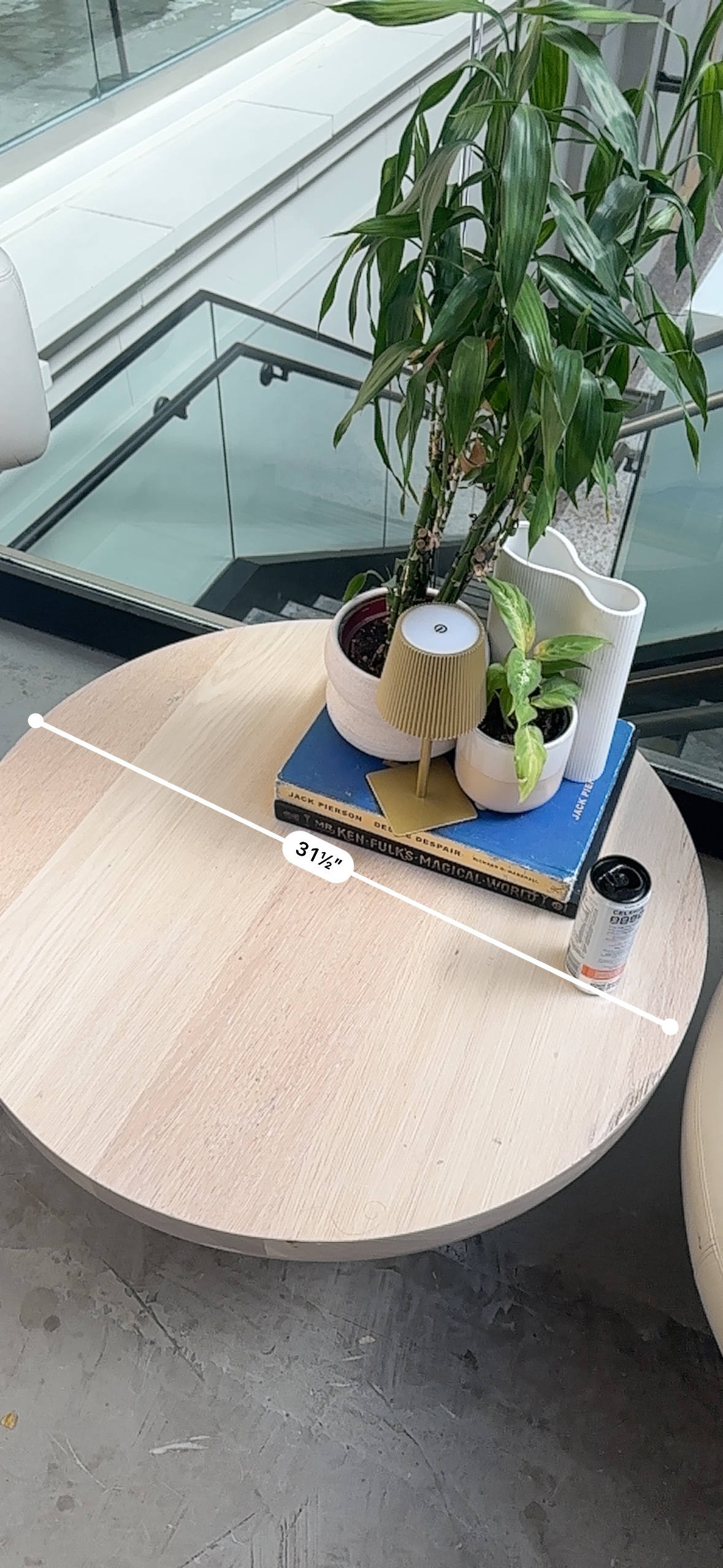
Measurements anchor the model.
 Nemotron

The supplied arch-room references are a 3′1½″ table diameter and a chair 3′2″ wide by 3′8″ tall. The piano area has a 3′1″ piano height and an approximately 13 × 13 ft rug. We retain these measurements; generated surfaces do not consistently agree with them.
Nemotron evaluates supplied evidence and calls tools. Deterministic geometry checks run in HomeOS. The model cannot mark assumptions as measured.
Real sources. Visible attempts.
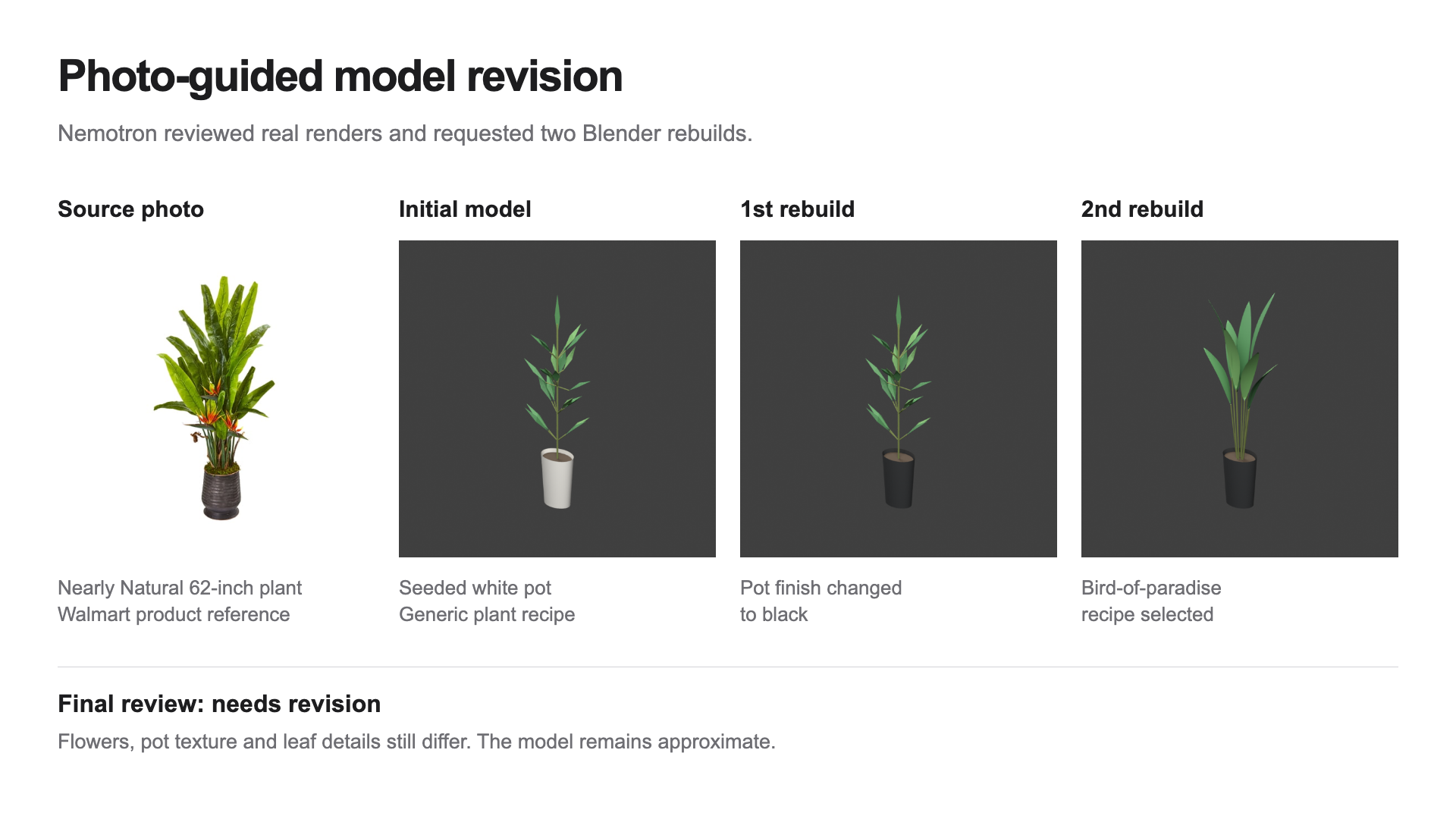
A product becomes an editable asset.
 Nemotron
You.com finds source pages. Nemotron extracts and assesses evidence on Crusoe. HomeOS keeps fresh product facts separate from search snippets, then invokes bounded Blender recipes.

The actual plant sequence changes the pot to black, then changes the plant recipe to bird of paradise. These are two recorded vision-guided rebuilds.
Nemotron visual review & revisionActual final appearance review: needs revision. Flowers, pot texture, and leaf detail still differ. This is an approximate model, with no exact-replica or passed-appearance claim.
Watch the recorded evidence and construction replay
Eight-second evidence sequence using the actual source photo and all three saved attempts.
Blender construction replay of a saved recipe. The replay is an explanatory reconstruction of the build sequence, not a live capture of autonomous Blender UI control.
The room can say no.
Nemotron tool orchestrationIn a separate furnished test scene, the first proposal blocks cleaning access. The checker returns the actual failure. Nemotron revises the placement and requests a new check against the same requirements.
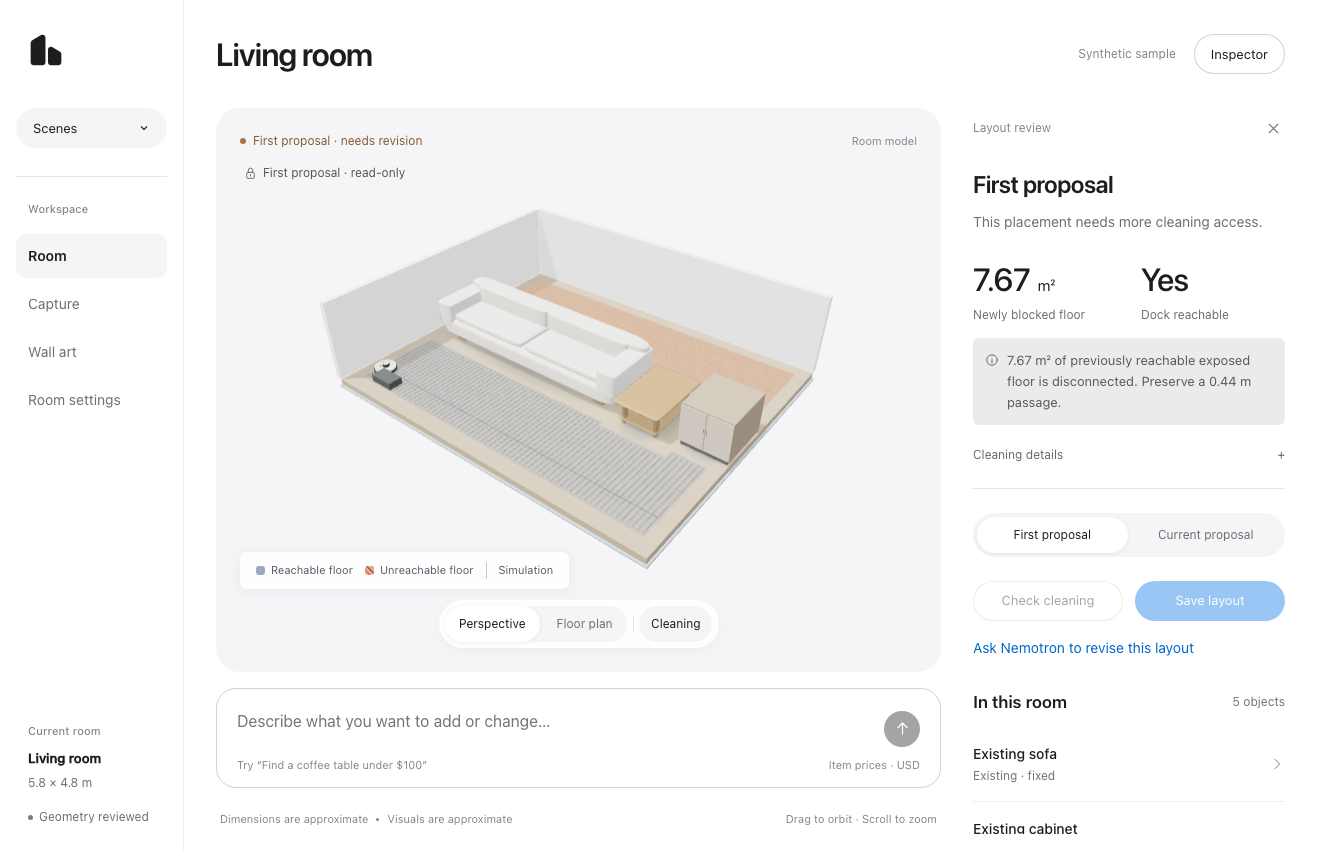
The saved verified furnishing loop uses a separate test scene. It is not an end-to-end physical-fit result for the three captured rooms above. Verification means the configured executable checks passed on that layout version; it does not guarantee physical-world clearance.
Additional example · plant + light, completed with Codex assistance
Two objects. The same checks.
A bird-of-paradise plant and a floor lamp total $344.59. The first placement disconnected 8.45 m² of floor; moving the lamp restored access. Fresh You.com pages, actual Blender exports and final scene checks passed.
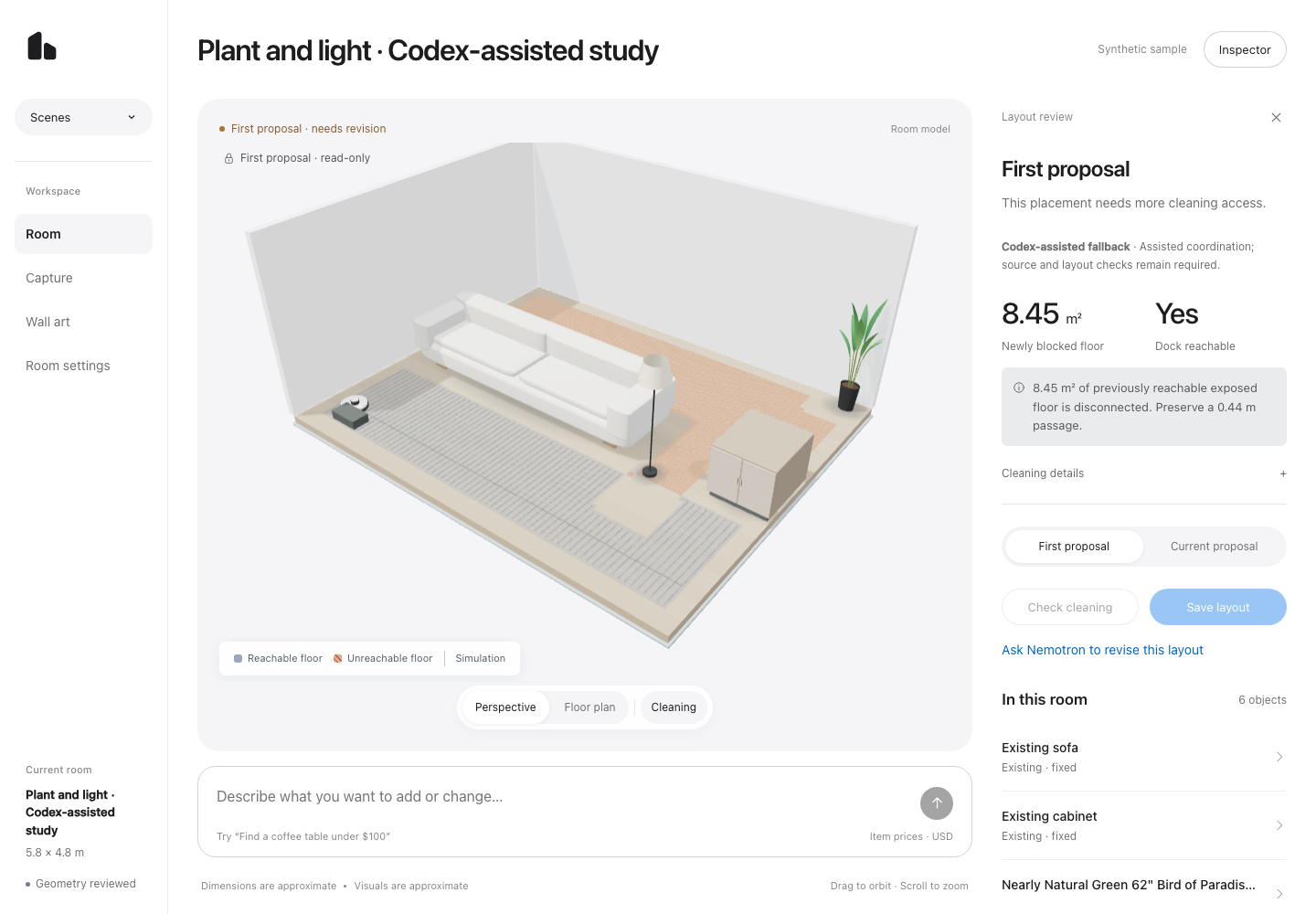
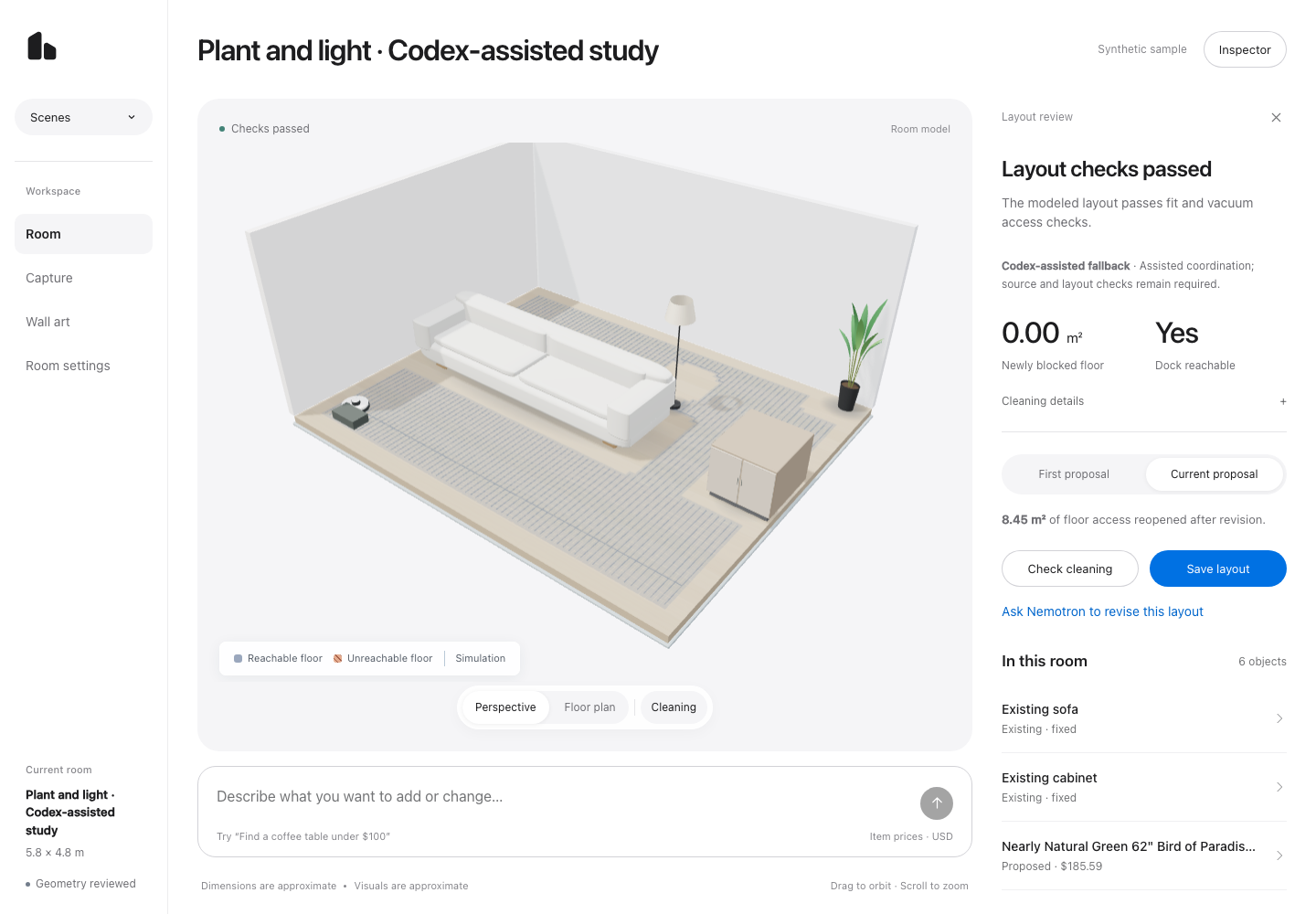
Codex supplied coordination, source extraction and image review after Crusoe rate limits. This is a separate synthetic test scene. Both appearance reviews retain unsupported visual differences. The main Nemotron demonstration above is unchanged. Choose “Plant + light · Codex-assisted” in the workspace scene picker.
Inspect this run’s resultTwo flows. One shared room.
Build the room.
From a recording to a planning scene you can review and edit.
- 01 · InputRoom video
Upload a walkthrough or record with the camera.
MP4 / MOV / supported WebM - 02 · Reconstruction

The app starts generation, then polls and caches the result.
App capture action · not an agent tool - 03 · ReferenceCaptured room
Explore the Gaussian splat and inspect the collider.
Appearance and geometry evidence - 04 · PlanningReview & edit
Check scale, floor, boundaries and existing-object footprints.
Confirm evidence before trusting fit checks
Process illustration. Recorded captures are real; a reconstruction is not automatically a confirmed floor plan. Existing objects in the editable plan use browser procedural previews, not Blender exports. The captured reference stays separate.
Improve the room.
Select a tool group to inspect a recorded call.
Illustrated sequence · no live executionNemotronruns on What you see, step by step.
Illustrated workflow- 1RecordSource video
- 2Reconstruct3D room reference
- 3Review sceneEditable planning geometry
- 4Find / buildSources + dimensioned models
- 5CheckFit + access findings
- 6ReviseUpdated proposal
- 7VerifyChecked, saved version
If checks fail, revise and check again.
Find products with evidence.
You.com finds candidates. The agent retrieves price, variant and overall dimensions before choosing one.
search_productsget_product_detailsSaved run bf13d383 · actual calls with summarized recorded events. This earlier run predates the current photo-review gate. Selecting or playing this diagram makes no live provider calls.
Tool access and execution limits
Nemotron selects typed tools. HomeOS validates their arguments. A separate checking role calls check_layout and simulate_cleaning; these execute deterministic scene checks. Model building uses fixed Blender recipes with a 90-second worker timeout. Furnishing has 16 + 12 × requested item count model rounds, capped at 60; this is a round limit, not a total API-call cap. Transient rate-limit and service-unavailable responses have at most two retries per HTTP request. A room or layout edit invalidates older verification.
Room review uses inspect_room, check_room, inspect_capture_geometry and submit_room_review. Capture geometry inspection is required when a ready capture is selected. Room confirmation remains a separate review step. define_task and validate_task establish requirements before furnishing. get_home reads the current shared state; stop reports unresolved work.
Demo scope
Fit checks use reviewed planning geometry. The SHACK15 captures still need alignment; the verified revision is demonstrated in a separate test scene. Unresolved checks prevent final verification.

A shared model
for your physical home.
Watch the workspace
Today: furnishing and access. Future: lighting, accessibility, maintenance and connected devices.